


HOW TO PAY PROPERTY TAX ONLINE 2026
- La Jolla De los Cabos
- hace 13 minutos
- 2 Min. de lectura
Even if we are in 2026, we are paying 2025 taxes, so please read the instructions below to know how to pay the property taxes this year.
This year, the Municipality is offering different ways to pay your taxes:
1. Going to one of the three different offices opened to the public,
2. Going to the Santander, Banamex or BBVA Bancomer Bank branches in México, or
3. Paying online with charge to your credit card.
4. Via electronic transfer
To pay with the credit card the steps are next:
1. Please click on the following link: https://www.tesoreria.loscabos.gob.mx/pagos-y-consultas/
2. On the right side of the page, you will see this image:

Please click in Pagar.
3. Type in your property tax number where it says CLAVE CATASTRAL. If you are not sure of your property tax number, please contact the HOA Office. Then click on the blue button BUSCAR.
4. Your statement should come up. Take a minute to read it and confirm it is under your name and the amount to pay is correct. If your information does not appear on the left window but you have an RFC and need a factura, please click on the BLUE ICON that says ALTA EN PADRON.
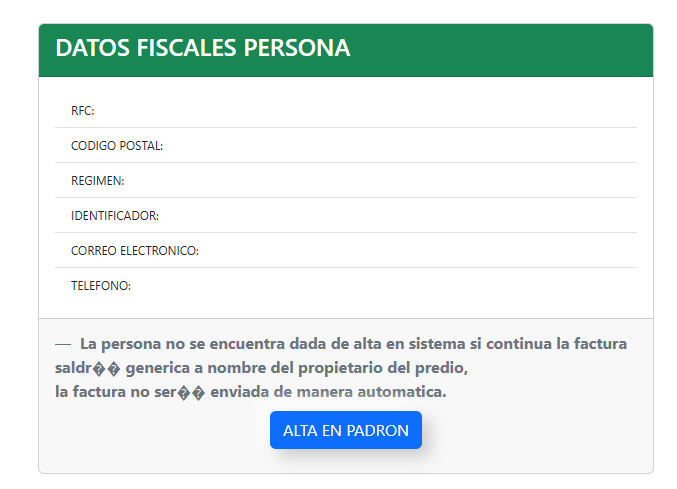
If your information is correct or you don´t have RFC or don´t need a factura, you may check the entire breakdown clicking on the BLUE ICON on the right window that says DESPLEGAR DESGLOSE.
5. For payment, please click on the GREEN ICON that says "Pagar/Pay”.
6. You will be redirected to the next page:

You may write your e-mail address in the field Correo electónico and your telephone number where it says Número de teléfono a 10 dígitos. Once you complete those fields, you can continue clicking in the icon Continuar.
7. On the next page you will need to fill in the following information in this order:
CREDIT CARD HOLDER NAME
CREDIT CARD 16 DIGIT NUMBER
EXPIRATION DATE (month and year)
SECURITY CODE (THE 3 DIGITS ON THE BACK OF YOUR CARD).
Once you complete the fields, please click on Continuar icon.
*** PLEASE NOTE THAT IF IN THIS STEP, NOTHING COMES UP, JUST A BLANK PAGE,
IT MEANS YOUR COMPUTER IS BLOCKING THE POP UPS, PLEASE GO TO SETTINGS,
AND ALLOW POP UPS.***
If your credit card is declined, check the number, your available limit, expiration date or contact your bank, as in some cases, transactions made out of the origin country may be blocked due to security reasons.
8. CONFIRM PAYMENT: you will receive a e-mail or a text on your cell phone (only if the number you provided is mexican) with a code to verify the payment, please look for it and place the numbers as required in the page to continue.
9. SAVE OR PRINT OUT YOUR RECEIPT, verify that IT IS UNDER YOUR NAME AND THE RIGHT AMOUNT.
Please keep your receipt in case you should have any question.
If you have any further questions, please feel free to contact the HOA Office.
Thank you,
HOA Office


Comentarios